How to make a Bootable Recovery Ghost DVD
Goal: Make a Bootable recovery ghost DVD
1.Create a bootable Disk image (*.IMA)
2.Create a Ghost image & put Ghost instruction in Autoexec.bat
3.Use Nero to burn DVD
*4.Make a menu for Bootable recovery ghost DVD
1.Create a bootable Disk image (*.IMA)
Tool: WinImage, Text editor
- 1.1 Create a bootable image by Winimage (2.88 is a better idea)
- 1.2 Put Ghost.exe (which can run under DOS) into this IMA file
- 1.3 Edit Autoexec.bat & Config.sys
1.3 Edit Autoexec.bat & Config.sys
File: udvd.sys mscdex.exe himem.sys MSCDEX.EXE
- In order to install DVD, we need to use UDVD.SYS.
- In order to use UDVD.SYS, we need use himem.sys to manage the memory
- In order to let Ghost locate the image file, we need to assign driver letter to CDROM
device=himem.sys /testmem:off
devicehigh=\UDVD.SYS /d:MSCD001
dos=high,umb
files=60
buffers=20
stacks=9,256
SWITCHES /N /F
LASTDRIVE=Z
EX for Autoexec.bat:
PROMPT $p$g
PATH A:\;
LH MSCDEX.EXE/D:MSCD001 /L:D
2.Create a Ghost image & put Ghost instruction in Autoexec.bat
- 2.1 Create Ghost image (<2g, because FAT can not handle the file over 2G )
- 2.2 Short name for image file (<5>
- 2.3 put Ghost instruction in Autoexec.bat
-clone, MODE={copy|load|dump|pcopy|pload|pdump},
SRC={drive|file|drive:partition},
DST={drive|file|drive:partition}
EX: load Ghost image from DVD to partition1
Ghost.exe -clone,mode=pload, src=D:\Name.gho:1, dst=1:2 /fx /rb /sure
EX: load Ghost image from partition2 to partition1
Ghost.exe -clone,mode=pload, src=1:2\Recovery.gho:1, dst=1:1 /fx /rb /sure
EX: dump partition1 to partition2
Ghost.exe -clone,mode=pdump,src=1:2,dst=1:3\Backup.gho -z3 /fx /rb /sure
3.Use Nero to burn DVD
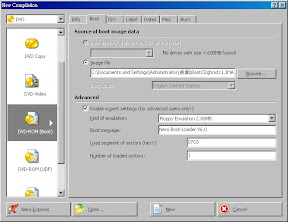
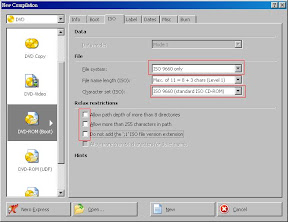
- Use Nero Burning ROM to create a bootable DVD
( remember to set the ISO, or you will have a image File selection Error (1909)
when you run Ghost)
*4.Make a menu for Bootable recovery ghost DVD
Example for Config.sys:
[MENU]
menuitem=SUB_1 Recovery from D:\Recovery.gho
menuitem=SUB_2 Recovery from DVD
menuitem=SUB_3 Backup To D:\Backup.gho
menuitem=SUB_4 Ghost
MENUCOLOR=15,1
MENUDEFAULT=SUB_2,20
[SUB_1]
[SUB_2]
[SUB_3]
[SUB_4]
[COMMON]
device=himem.sys /testmem:off
devicehigh=\UDVD.SYS /d:mscd001
dos=high,umb
files=60
buffers=20
stacks=9,256
SWITCHES /N /F
LASTDRIVE=Z
Example for Autoexec.bat:
@ECHO OFF
PROMPT $p$g
PATH A:\;
LH MSCDEX.EXE/D:MSCD001 /L:D
GOTO %CONFIG%
:SUB_1
Ghost.exe -clone,mode=pload,src=1:3\Recovery.gho:1,dst=1:2 /fx /rb /sure
GOTO END
:SUB_2
Ghost.exe -clone,mode=pload,src=D:\Name.gho:1,dst=1:2 /fx /rb /sure
GOTO END
:SUB_3
Ghost.exe -clone,mode=pdump,src=1:2,dst=1:3\Backup.gho -z3 /fx /rb /sure
GOTO END
:SUB_4
mouse
Ghost.exe
GOTO END
:END
note: I do this for my love. To let her need not to worry about all computer problem.
1 comments:
possible help me to create one ?
Post a Comment